-->
Visualizzazione post con etichetta Xubuntu. Mostra tutti i post

Canonical rilascia Xubuntu 26.04 derivata ufficiale di Ubuntu

Xubuntu_wallpaper_page_turn_raccoon

Canonical e la comunità Xubuntu hanno rilasciato Xubuntu 26.04 LTS, una delle derivate ufficiali di Ubuntu 26.04 “Resolute Raccoon”.


Xubuntu 26.04 LTS — Rilascio ufficiale

Xubuntu 26.04 è una versione LTS (Long Term Support) basata su Ubuntu 26.04, pensata per offrire un sistema:

✔ leggero
✔ veloce
✔ stabile
✔ adatto anche a PC meno recenti


Novità principali

1. Base Ubuntu 26.04

Xubuntu eredita tutte le novità del sistema base:

  • Linux kernel 7.0
  • supporto hardware migliorato
  • stack grafico aggiornato (Mesa, Vulkan)
  • maggiore stabilità e sicurezza

Risultato:

  • sistema moderno e aggiornato
  • migliore compatibilità con hardware recente

️ 2. Xfce 4.20 aggiornato

Il desktop leggero di Xubuntu riceve aggiornamenti importanti:

  • Xfce 4.20
  • Thunar (file manager) più veloce
  • miglioramenti a pannello e componenti GTK

In pratica:
✔ interfaccia semplice
✔ consumo RAM molto basso
✔ grande fluidità anche su PC vecchi


⚡ 3. Prestazioni migliorate

  • avvio più rapido
  • minor consumo di risorse rispetto a GNOME/KDE
  • maggiore reattività generale

Ideale per:

  • laptop datati
  • PC con poca RAM
  • hardware economico

4. Supporto a lungo termine (LTS)

  • aggiornamenti fino ad aprile 2029
  • sicurezza garantita nel tempo
  • stessa base di supporto di Ubuntu principale

5. Software leggero

Xubuntu mantiene un set minimale di applicazioni:

  • Firefox
  • Thunar
  • Mousepad
  • utility GTK essenziali

Obiettivo:

  • niente bloat
  • sistema rapido e snello

6. Miglioramenti generali

  • installazione più semplice
  • migliore rilevamento hardware
  • sistema più stabile e coerente

In sintesi

Xubuntu 26.04 LTS è:

✔ una derivata ufficiale di Ubuntu
✔ basata su Xfce 4.20
✔ molto leggera e veloce
✔ stabile e supportata fino al 2029
✔ ideale per PC vecchi o poco potenti


A chi è consigliata?

SÌ se vuoi:

  • un sistema leggero
  • prestazioni elevate su hardware debole
  • semplicità assoluta

NO se vuoi:

  • effetti grafici avanzati (meglio Kubuntu)
  • ambiente creativo (meglio Ubuntu Studio)
  • funzioni AI o smart (meglio Ubuntu Kylin)

Conclusione

Xubuntu 26.04 è una delle migliori scelte per chi cerca velocità e leggerezza senza rinunciare alla stabilità LTS di Ubuntu.

Download

Ubuntu 25.10 è ora disponibile. Novità e download per tutte le versioni ufficiali.

Ubuntu 25.10

Oggi è il 9 novembre e Canonical ha rilasciato Ubuntu 25.10 . Sebbene ogni volta che sentiamo la parola "Ubuntu" pensiamo a un sistema operativo, in realtà è la base per la versione principale con GNOME e le altre versioni, sia ufficiali che non ufficiali (come Linux Mint). Questo articolo discute le versioni ufficiali, che sono in totale undici.

Abbiamo pubblicato questo articolo non appena l'immagine ISO della versione principale è stata disponibile per il download. Altre versioni, come Edubuntu, Kubuntu e Lubuntu, erano già disponibili ore prima. Questo post verrà aggiornato con informazioni non appena ne saremo a conoscenza, comprese eventuali novità rilasciate da una delle versioni ufficiali. Ecco i punti salienti di ogni versione.

Notizie generali sulla famiglia dei Quokka in cerca di cibo

Come abbiamo detto, tutte le versioni ufficiali sono "Ubuntu" e condividono la stessa base, a meno che una di esse non decida di non adottarne una, il che non è molto comune. L'elenco generale delle nuove funzionalità sarebbe il seguente:

  • Supportato per 9 mesi, fino a luglio 2026.
  • Linux 6.17 . Non posso confermare se la versione inclusa subito sia una Release Candidate, ma non dovrebbe esserlo perché la versione stabile è disponibile da 10 giorni.
  • Dracut sostituisce initramfs-tools come generatore initramfs predefinito.
  • Miglioramenti al supporto di avvio ARM64, con l'aggiunta di uno stub UEFI minimo "stubble" per migliorare la compatibilità di avvio.
  • sudo ora è sudo-rs, un'implementazione predefinita di Rust. La versione tradizionale rimane disponibile per compatibilità.
  • LibreOffice 25.8.
  • Viene introdotto Ubuntu Insights , che sostituisce Ubuntu Report per raccogliere metriche di sistema (senza dati personali) e richiede il consenso esplicito dell'utente.
  • Pacchetti aggiornati alle versioni più recenti, tra cui:
    • GCC 15.2.
    • glibc 2.42.
    • Binutils 2.45.
    • LLVM 20.
    • Ruggine 1,85.
    • Vai 1.24.
    • OpenJDK 25.
    • Python 3.13.7.
    • OpenSSL 3.5.
    • Tabella 25.2.
    • APT 3.1.
    • systemd 257.9.
    • PipeWire 1.4.7.
    • BlueZ 5.83.
    • Gstreamer 1.26.6.
    • Power Profiles Daemon 0.30.

Ed eccoci qui con le novità e i download (dal pulsante) di ogni versione.

Ubuntu 25.10: Nuove funzionalità oltre il desktop

Ubuntu 25.10

Oltre alle modifiche condivise, Ubuntu 25.10 include la nuova funzionalità più importante del desktop GNOME 49 , tra cui un file manager aggiornato con una finestra di ricerca ridisegnata e più funzionale. Le icone dei tipi di file ora presentano un sottile bordo tratteggiato che le rende più facili da distinguere durante l'interazione. Inoltre, è stata aggiunta una nuova scorciatoia: Ctrl+ ., che apre la cartella corrente direttamente nel terminale.

La schermata di blocco acquisisce importanza grazie al supporto per il protocollo MPRIS , che mostra un widget con controlli multimediali durante la riproduzione di contenuti. È inoltre presente un menu di accessibilità , che offre più opzioni senza dover effettuare l'accesso.

La modalità "Non disturbare" è stata spostata nelle impostazioni rapide nella barra delle applicazioni, mentre l' app Impostazioni presenta un'interfaccia più pulita e coerente. Anche le animazioni di sistema sono state migliorate, migliorando la fluidità complessiva.

Tra le modifiche all'applicazione, Ptyxis diventa il nuovo terminale predefinito e Loupe assume il ruolo di visualizzatore di immagini predefinito. Infine, X11 scompare come server grafico primario , consolidando la transizione finale a Wayland .

Kubuntu 25.10: Addio a X11 con una mossa rischiosa

Kubuntu 25.10

Il team di Kubuntu ha lavorato duramente per rilasciare la versione 25.10 con l'ultima novità dell'ecosistema KDE: Plasma 6.4 , interamente basato su Qt 6. Questa è la quinta versione principale della serie 6, una versione che perfeziona ulteriormente la transizione alla prossima generazione del desktop KDE.

Di default, il sistema si avvia con Plasma Wayland , rafforzando il passaggio a un ambiente moderno ed efficiente. Chi preferisce il classico X11 può continuare a utilizzarlo senza complicazioni semplicemente installando il pacchetto plasma-session-x11.

Kubuntu 25.10 include Qt 6.8 e KDE Frameworks 6.17.0 , garantendo la compatibilità con le più recenti tecnologie del framework KDE. Tuttavia, il supporto per le applicazioni più vecchie basate su Qt5 e Frameworks 5 rimane invariato, con le versioni Qt 5.15.17 e KDE Frameworks 5.116.0 disponibili nei repository.

Tutte le applicazioni della suite KDE Gear incluse nei repository Ubuntu o Debian sono state aggiornate almeno alla versione 25.08 , garantendo coerenza, stabilità e accesso agli ultimi miglioramenti dell'ecosistema KDE.

Lubuntu 25.10, un aggiornamento nell'ambiente più leggero

Lubuntu 25.10

La novità più importante di Lubuntu 25.10 è il passaggio a LXQt 2.2, il desktop di cui abbiamo parlato ad aprile di quest'anno . Inoltre, alcuni pacchetti sono stati aggiornati, come

  • Qt 6.8.3
  • LibreOffice 25.8
  • VLC 3.0.21
  • Featherpad 1.6.2
  • Scopri Software Center 6.4.5
Xubuntu 25.10 rimane su Xfce 4.20 mentre recupera

Xubuntu 25.10

La versione di Ubuntu basata su Xfce utilizza Xfce, ovviamente, ma anche componenti di altri desktop. In Questing Quokka, Xubuntu utilizza Xfce 4.20, una versione con gli ultimi aggiornamenti, miglioramenti di stabilità e un maggiore supporto per Wayland. Inoltre, molte applicazioni provengono direttamente da GNOME 49 e MATE 1.26.

Ubuntu Budgie 25.10, ultima tappa verso Wayland

Ubuntu Budgie 25.10

Lo sviluppo di questa versione si è concentrato sulla transizione a un ambiente basato su Wayland , un cambiamento che sarà completato nella versione 26.04 con Budgie Desktop 10.10 , che sarà esclusivamente Wayland. Per ora, Budgie 25.10 continua a utilizzare Xorg , sebbene gli utenti possano provare Wayland tramite un PPA.

Tra i miglioramenti più degni di nota:

  • È incluso Budgie Desktop 10.9.3 , che supporta GNOME 49 e con nuove chiavi specifiche in gsettings , che ti obbligano a riconfigurare le chiavi personalizzate.
  • Il Budgie Control Center è stato aggiornato, mantenendo la compatibilità con le tavolette Wacom nonostante le modifiche a GNOME.
  • Il nuovo compositore sarà basato su wlroots (labwc) , leggero e veloce, con un'integrazione perfetta delle modifiche di GNOME.
  • Anche Wayfire e Mir sono stati testati come alternative sperimentali.
  • Il vecchio gnome-screensaver non c'è più , sostituito da swaylock (o gtklock per chi preferisce lo stile classico).
  • Diversi applet ufficiali e di terze parti funzionano già con Wayland.
  • I temi Pocillo e QogirBudgie sono stati completamente adattati a Snaps , migliorando l'integrazione visiva.
  • Lo sfondo e l'app di benvenuto sono stati aggiornati, ora includendo impostazioni specifiche per "Questing".
Ubuntu MATE 25.10

Ubuntu MATE 25.10

In attesa di conoscere l'elenco delle nuove funzionalità.

Ubuntu Studio 25.10 introduce la barra in stile macOS e aggiorna il suo metapacchetto per i creatori di contenuti

Ubuntu Studio 25.10

Ubuntu Studio 25.10 è ricco di miglioramenti volti a rendere l'esperienza più confortevole e potente sia per i creatori di contenuti che per gli utenti abituali. Tra le modifiche più evidenti c'è un layout opzionale in stile macOS , con dock inferiore e menu globale, progettato per chi desidera una transizione più familiare. Inoltre, le impostazioni audio sono state ampliate, offrendo nuove opzioni per personalizzare l'esperienza sonora.

Nel settore musicale, le novità più importanti includono l'aggiunta di JackTrip , che consente di collegare graficamente l'audio tra più dispositivi per la collaborazione remota, e il ritorno di IDJC (Internet DJ Console) dopo anni di assenza. Sono stati inoltre aggiunti numerosi plugin audio e sintetizzatori , e sono stati aggiornati strumenti essenziali come PipeWire 1.4.7 , Audacity 3.7.5 e Carla 2.5.10 , garantendo un flusso di lavoro più stabile e moderno.

Anche il reparto grafica e fotografia non è da meno. GIMP 3.0.4 , Krita 5.2.11 e Inkscape 1.4.2 offrono un ambiente potente per l'editing delle immagini, mentre digiKam 8.7.0 rimane il punto di riferimento per la gestione delle foto. Sono disponibili anche nuove applicazioni come Photocollage e PicPlanner , che ampliano le possibilità creative degli utenti.

Per i video, KDEnlive 25.08.1 e Freeshow 1.4.9 garantiscono un flusso di lavoro di editing più raffinato ed efficiente.

Per quanto riguarda l' ambiente desktop , Ubuntu Studio 25.10 è basato su KDE Plasma 6.4.5 , accompagnato da KDE Frameworks 6.17 , Qt 6.8.3 e KDE Gear 25.08.1 , offrendo un desktop moderno, veloce e coerente con le ultime tecnologie KDE.

Tra i pacchetti multimediali più rilevanti ci sono Blender 4.3.2, Krita 5.2.11, GIMP 3.0.4, Ardour 8.12.0, Scribus 1.6.3, Darktable 5.0.1, Inkscape 1.4.2, Carla 2.5.10, OBS Studio 30.2.3, MyPaint 2.0.1, Audacity 3.7.5 e KDEnlive 25.08.1, che offrono una suite completa per i creatori.

Edubuntu 25.10 aggiorna il desktop e aggiunge altri giochi per l'apprendimento.

Edubuntu 25.10

Non ci sono molte novità da evidenziare in Edubuntu 25.10, poiché si tratta sostanzialmente della versione principale con i metapacchetti didattici. Le app e il desktop sono stati aggiornati, utilizzando lo stesso GNOME 49 della versione principale. Inoltre, sono stati aggiunti più giochi didattici e Thunderbird è ora il client di posta elettronica preferito, in sostituzione di Geany.

Ubuntu Unity 25.10

Ubuntu Unity 25.10

In attesa dell'elenco delle nuove funzionalità e del link per il download, che non è ancora stato pubblicato.

Ubuntu Cinnamon 25.10 passa a Cinnamon 6.4

Ubuntu Cinnamon 25.10

Ubuntu Cinnamon 25.10 include l'ultima versione della serie Cinnamon 6.4 , che apporta miglioramenti e stabilità al desktop. Questa versione include Cinnamon 6.4.12 , Cinnamon Control Center 6.4.1 , Screensaver 6.4.0 , Cinnamon Session 6.4.1 , CJS 128 , mozjs 128 , Settings Daemon 6.4.3 , Muffin 6.4.1 e Nemo 6.4.5 , oltre all'integrazione con XDG Desktop Portal (XApp) 1.1.2 , offrendo un ambiente moderno, coerente e affidabile per gli utenti Cinnamon.

Altre applicazioni degne di nota includono GNOME Calculator 48.0.2 , GNOME Calendar 48.1 , GNOME Screenshot 41 , Evince 48.0 , gedit 48.1 , gThumb 3.12.7 , Rhythmbox 3.4.8 , Deja Dup 49 , File Roller 44.5 , LibreOffice 25.8.1 e Simple Scan 48.1 , che costituiscono una suite software aggiornata e pronta per l'uso quotidiano.

Anche l'esperienza visiva riceve attenzione: il tema Yaru-Cinnamon è stato aggiornato, offrendo un aspetto più curato e moderno, grazie al lavoro della community e di sviluppatori come Initu Castilhos .

Ubuntu Kylin 25.10 arriva con Ukui 4.0

Ubuntu Kylin 25.10

Ubuntu Kylin 25.10 utilizza UKUI 4.0 come ambiente grafico e ha aggiornato le applicazioni per renderle più recenti. Ci dispiace non poter dire di più su questa versione ufficiale, ma tutto ciò che è importante è in cinese. Hanno un sito web in inglese , ma non viene aggiornato con la stessa frequenza.

Goditi Ubuntu 25.10, qualunque sia la versione che scegli.

Ora è il momento di sfruttare tutte le novità di Ubuntu 25.10, qualunque sia la versione che stai utilizzando. Buon divertimento!


Come installare Xubuntu su una chiavetta USB (Xubuntu 20.04)

La seguente "guida" vi aiuta a installare Xubuntu su un drive USB esterno, che deve avere almeno 8GB di capacità (l'installazione minima di Xubuntu 20.04 ha bisogno di circa 5GB). Avrete anche bisogno di un drive USB esterno temporaneo con almeno 4GB per avviare l'immagine di installazione di Xubuntu (o per masterizzare un disco ottico).

Naturalmente, se avete un computer con risorse sufficienti (almeno 8GB di RAM), potete anche installare Xubuntu in una macchina virtuale (VirtualBox, per esempio). In questo caso, avrete bisogno di almeno 4 GB di RAM e 8 GB di spazio su disco per Xubuntu.


Xubuntu è un sistema operativo Linux basato su Ubuntu e sviluppato dalla comunità.

Xubuntu è un sistema operativo elegante e facile da usare. Xubuntu include Xfce, che è un ambiente desktop stabile, leggero e configurabile.

È ideale per chiunque voglia il meglio dai propri PC, laptop e netbook, dando loro un look and feel moderno e ottenendo funzionalità sufficienti ed efficienti per l'uso quotidiano. Funziona bene anche su macchine più vecchie.

Per ulteriori informazioni, visitate il sito web di Xubuntu.
Il nome

La "X" in Xubuntu viene da Xfce, l'ambiente desktop di Xubuntu. Così anche la parola "ubuntu" mostra la dipendenza e l'uso del kernel Ubuntu, che a sua volta rappresenta il nucleo filosofico del sistema operativo. Un significato approssimativo della parola ubuntu è "umanità verso gli altri". Per saperne di più sulla filosofia e gli ideali dietro Ubuntu e Xubuntu potete andare alla pagina Filosofia di Ubuntu.

Oltre ad utilizzare il kernel di Ubuntu, Xubuntu utilizza anche l'infrastruttura fornita e sponsorizzata da Canonical Ltd., una società fondata da Mark Shuttleworth.

 Installare Xubuntu su una pen-drive USB

Supponendo che abbiate deciso di utilizzare Xubuntu 20.04 su un disco USB, ecco i passi da eseguire (per installare Xubuntu su una partizione del disco del computer, le istruzioni sono quasi le stesse):

    Scarica l'immagine di installazione da qui.
    "Masterizzare" la chiavetta USB da 4GB con l'immagine. A seconda del vostro attuale sistema operativo, utilizzate le seguenti istruzioni per Windows, OSX, Ubuntu (e derivati), o la console per tutti i Linux.
    Avviare l'immagine dalla porta USB. Questo passo dipende dal tuo computer. La maggior parte dei PC può scegliere il dispositivo di avvio premendo il tasto F12 quando il PC si sta avviando. Su un Mac, devi tenere premuto il tasto alt durante l'avvio.
    Seleziona l'opzione Prova Xubuntu senza installare.
    Quando il sistema operativo è in funzione, configurare la rete.
    Inserite anche la chiavetta USB da 8GB dove verrà installato Xubuntu.
    Seleziona Installa Xubuntu 20.04 LTS .
    Seleziona l'inglese come lingua usata durante l'installazione e il sistema installato. Questo vi aiuterà nel caso abbiate bisogno di cercare informazioni su Internet, fornendo descrizioni di bug in inglese.
    Seleziona il layout della tua tastiera (probabilmente lo spagnolo).
    Aprite un terminale e digitate: df - h per vedere tutte le partizioni del disco montate e la loro capacità. Si noti che nessuna partizione di / dev / sda (il disco rigido) deve essere montata (anche se è possibile farlo, non è necessario montare alcuna partizione del disco rigido), la partizione / dev / sdb1 (con l'immagine di Xubuntu) deve essere montata e infine, se Thunar (il file manager predefinito in Xubuntu) ha riconosciuto la prima partizione del secondo drive USB esterno, dovrebbe apparire come / dev / sdc1. Questa partizione deve essere smontata per installarvi Xubuntu. Tuttavia, se continuate il processo di installazione senza smontarlo, il programma di installazione vi chiederà di farlo. In questa descrizione, si è supposto che il vostro computer abbia un solo disco rigido.
    Scegliete Scarica aggiornamenti durante l'installazione di Xubuntu e Installa software di terze parti per l'hardware grafico e Wi-Fi e formati multimediali aggiuntivi, per avere accesso all'ultimo software disponibile per Ubuntu (e i suoi derivati).
    Scegliere Erase Disk e installare Xubuntu. Ignora le caratteristiche avanzate. Aspetta un paio di minuti
    Selezionare l'unità corrispondente alla chiavetta USB da 8GB ( / dev / sdc ). Non scegliere / dev / sda (il disco principale del computer perché potrebbe cancellarne il contenuto)! Selezionare / dev / sdc !
    A  questo punto dell'installazione, dovreste considerare (a seconda della quantità di RAM installata sul vostro computer e della dimensione del drive USB) di creare una partizione specifica per lo swapping. La regola generale è quella di creare una partizione della stessa dimensione della RAM. Tuttavia, probabilmente non puoi farlo su una chiavetta USB da 8 GB perché hai bisogno di almeno 5 GB per un'installazione di Xubuntu. Comunque, notate che questo passo è opzionale perché potete sempre scambiare un file (un processo un po' più lento che usare la partizione dedicata). Notate anche che PRMC richiede solo pochi MB di memoria per funzionare, e quindi probabilmente non avrete bisogno di scambiare alcuna pagina di memoria. Se decidi di creare una partizione di swap dedicata, clicca su "advanced partitioning tool" e fai le modifiche che vuoi, e verifica anche che il boot loader ( GRUB ) sia installato in / dev / sdc1 . Ma ricordate, tutte le azioni descritte qui sono opzionali (tranne selezionare / dev / sdc1 per GRUB).
    Fare clic su Install Now. Qualcosa come: Se continuate, i cambiamenti elencati di seguito saranno scritti sui dischi. Altrimenti, puoi fare ulteriori modifiche manualmente. ATTENZIONE: Questo distruggerà tutti i dati sulle partizioni che avete cancellato, così come le partizioni che saranno formattate. Le tabelle delle partizioni dei seguenti dispositivi sono cambiate: SCSI8 (0,0,0) (sdc) Le seguenti partizioni saranno formattate: SCSI8 (0,0,0) (sdc) partizione # 1 come ESP SCSI8 (0,0,0) (sdc) partizione # 2 come ext4
    Scegli il tuo fuso orario.
    Imposta il tuo account personale, l'hostname e il processo di registrazione.
    Aspettate che l'installazione finisca e avviate il vostro nuovo Xubuntu. Non preoccupatevi se grub etichetta Xubuntu come Ubuntu. Questo è normale.

Canonical rilascia Xubuntu 21.10 "Impish Indri" con con GNOME Disk Analyzer per rendere più facile il monitoraggio.

È stata rilasciata la versione 21.10 di Xubuntu, una distribuzione che integra il sistema di base di Ubuntu con l'ultima versione del desktop Xfce.

La distribuzione utilizza, dove è possibile, programmi scritti appositamente per Xfce i quali, anche se si basano sulle GTK+ 2, la rendono più leggera rispetto ad Ubuntu.

L'obiettivo di Xubuntu è quello di fornire una distribuzione facile da usare, basata su Ubuntu, che si focalizza sull'integrazione, sull'usabilità e sull'ottenimento di accettabili prestazioni su macchine con poca memoria. Xubuntu viene sviluppato autonomamente come parte della comunità di Ubuntu, del quale riprende i valori. 

Il rilascio di Xubuntu 21.10 "Impish Indri". 

"Il team di Xubuntu è felice di annunciare il rilascio immediato di Xubuntu 21.10. Xubuntu 21.10, nome in codice Impish Indri, è un rilascio regolare e sarà supportato per 9 mesi, fino a giugno 2022. 
 
Se avete bisogno di un ambiente stabile con un tempo di supporto più lungo vi consigliamo invece di utilizzare Xubuntu 20.04 LTS. 
 

In evidenza.

Xubuntu ora è preinstallato con GNOME Disk Analyzer, GNOME Disk Utility e Rhythmbox; Disk Analyzer e Disk Utility rendono più facile il monitoraggio e la gestione delle partizioni; Rhythmbox consente la riproduzione di musica con una libreria multimediale dedicata; Pipewire è ora incluso in Xubuntu ed è utilizzato in combinazione con PulseAudio per migliorare la riproduzione audio e il supporto hardware in Linux; scorciatoie da tastiera - il tasto Super (Windows) ora rivelerà il menu delle applicazioni, le scorciatoie da tastiera Super+ esistenti non sono interessate. Problemi noti: il prompt di spegnimento potrebbe non essere visualizzato alla fine dell'installazione". 
 
Continua a leggere l'annuncio del rilascio per ulteriori dettagli. 
 

Download.

xubuntu-21.10-desktop-amd64.iso (2,000MB, SHA256, signature, torrent, pkglist).


Ubuntu 21.04 "Hirsute Hippo" e derivate ufficiali rilasciate, conosci le novità più importanti.

Tra le principali innovazioni presentate in Ubuntu 21.04 "Hirsute Hippo" possiamo vedere che il raffinato kernel Linux è stato aggiornato alla versione 5.11 , che include il supporto per l'enclave Intel SGX, un nuovo meccanismo per intercettare le chiamate di sistema, un bus di aiuto virtuale, un rapido filtraggio di chiamate di sistema in seccomp, cessazione del supporto per l'architettura ia64, trasferimento della tecnologia WiMAX al ramo di staging, capacità di incapsulare SCTP in UDP.

Mentre per la parte desktop, è inclusa la versione 3.38 di GNOME , ma con la caratteristica che contiene applicazioni GNOME sincronizzate con lo sviluppo di GNOME 40.

Questa decisione di non includere la versione 40 è stata dovuta agli sviluppatori Canonical che hanno affermato che il passaggio alla nuova versione è stato ancora troppo presto.

Rilasciata Ubuntu 21.04 "Hirsute Hippo" e derivate ufficiali.

Ecco l'elenco di tutti i rilasci via Distrowatch.


Ubuntu 21.04 "Hirsute Hippo".

Canonical has released Ubuntu 21.04 which carries the code name "Hirsute Hippo". The distribution's new version ships with GNOME running on a Wayland session as the default desktop and includes the built-in ability to join Active Directory domains. "Ubuntu machines can join an Active Directory (AD) domain at installation for central configuration. AD administrators can now manage Ubuntu workstations, which simplifies compliance with company policies. Ubuntu 21.04 adds the ability to configure system settings from an AD domain controller. Using a Group Policy Client, system administrators can specify security policies on all connected clients, such as password policies and user access control, and Desktop environment settings, such as login screen, background and favourite apps. Ubuntu 21.04 uses Wayland by default, a significant leap forward in security. Firefox, OBS Studio and many applications built with Electron and Flutter take advantage of Wayland automatically, for smoother graphics and better fractional scaling." Additional details can be found in the distribution's release announcement and in the release notes.  

Download (pkglist): ubuntu-21.04-desktopamd64.iso (2,688MB, SHA256, signature, torrent), ubuntu-21.04-live-server-amd64.iso (1,119MB, SHA256, signature, torrent).


Ubuntu Budgie 21.04 "Hirsute Hippo".

Ubuntu Budgie is an Ubuntu-based distribution featuring the Budgie desktop. The Ubuntu Budgie team has released version 21.04 of their distribution which will receive support through to January 2022. The new release includes a new look, an updated Budgie desktop, and introduces a build for Raspberry Pi computers. "This is a regular release supported for 9 months. For those looking for a longer term support release we recommend our 20.04 LTS version which is supported for 3 years. Key highlights: Release of our first Raspberry Pi image. Thanks to new team member Sam, we are very proud of the work done and the positive feedback received from all beta testers. A huge 21.04 regular release: brand new budgie-desktop version. Layouts capability of our Window Shuffler. Refinements of our own unique Window Tiling capability - we have also received feedback that this works on Mate, GNOME Shell (Xorg), XFCE. So do give ‘Window Shuffler’ a try on your desktop. Brand new Mojave makeover in Budgie Themes and Layouts Brand new WhiteSur makeover in Budgie Themes and Layouts." Additional information can be found in the project's release announcement and in the release notes. Download: ubuntu-budgie-21.04-desktop-amd64.iso (2,628MB, SHA256, signature, torrent, pkglist).


Ubuntu MATE 21.04 "Hirsute Hippo".

Martin Wimpress has announced the release of Ubuntu MATE 21.04. The new version offers nine months of support and includes several visual changes. "The MATE Desktop team released maintenance updates for the current stable 1.24 release of MATE. We've updated the MATE packaging in Debian to incorporate all these bug fixes and translation updates and synced those packages to Ubuntu so they all feature in this 21.04 release. There are no new features, just fixes. Ayatana Indicators: A highlight of the Ubuntu MATE 20.10 release was the transition to Ayatana Indicators. You can read the 20.10 release notes to learn what Ayatana Indicators are and why this transition will be beneficial in the long term. We've added new versions of Ayatana Indicators including ‘Indicators' settings to the Control Center, which can be used to configure the installed indicators." Further information can be found in the project's release announcement and in the release notes. Download: ubuntu-mate-21.04-desktop-amd64.iso (2,828MB, SHA256, signature, torrent, pkglist). 

Ubuntu Studio 21.04 "Hirsute Hippo".

The Ubuntu Studio team have announced the release of version 21.04 of their multimedia-focused distribution. The project's latest release will be supported through to January 2022 and includes several updated utilities: "This release includes Plasma 5.21.4, the full-featured desktop environment made by KDE. It uses the Materia theme and the icons are Papirus icons. Studio Controls has seen further development as its own independent project and has been updated to version 2.1.4. Ardour 6.6+ (a future 6.7 snapshot). Ardour has been updated to version 6.6+, meaning this is a git snapshot of what will eventually be Ardour 6.7. This had to be done because Ardour 6.5 started to fail to build with a newer library introduced into the Ubuntu archives, and could only be resolved with this snapshot. We hope to have Ardour 6.7 in via official updates once released. Agordejo is new to Ubuntu Studio this release. It was brought-in for those unsatisfied with RaySession's audio session management but found New Session Manager's interface to be too old and clunky." Additional details can be found in the project's release announcement.Download: ubuntustudio-20.10-dvd-amd64.iso (3,650MB, SHA256, signature, torrent, pkglist).


Kubuntu 21.04 "Hirsute Hippo".


Jonathan Riddell has announced the release of Kubuntu 21.04, a brand-new version of the project's official Ubuntu flavour featuring the KDE Plasma desktop: "The Kubuntu team is happy to announce that Kubuntu 21.04 LTS has been released, featuring the 'beautiful' KDE Plasma 5.21: simple by default, powerful when needed. Code-named 'Hirsute Hippo', Kubuntu 21.04 continues our tradition of giving you friendly computing by integrating the latest and greatest open-source technologies into a high-quality, easy-to-use Linux distribution. The team has been hard at work through this cycle, introducing new features and fixing bugs. Under the hood, there have been updates to many core packages, including a new 5.11-based Linux kernel, KDE Frameworks 5.80, KDE Plasma 5.21 and KDE Release Service Applications 20.12.3. Krita, Kdevelop, Yakuake and many many more applications are updated." 

Read the resto of the release announcement for more information. Download: kubuntu-21.04-desktop-amd64.iso (2,805MB, SHA256, signature, torrent, pkglist).

 Xubuntu 21.04 Hirsute Hippo".

Yousuf Philips has announced the release of Xubuntu 21.04, a new stable build of the distribution that integrates the Ubuntu base system with the latest Xfce desktop: "The Xubuntu team is happy to announce the immediate release of Xubuntu 21.04. Xubuntu 21.04, code-named 'Hirsute Hippo', is a regular release and will be supported for 9 months, until January 2022. Highlights: Xfce 4.16 - this is Xubuntu's first release with the new GTK 3-only Xfce 4.16, which features a year's worth of updates and fixes; new software - Xubuntu now comes pre-installed with HexChat and Synaptic to provide easy IRC communication and advanced package management; minimal install - you can now install a minimal version of the Xubuntu desktop through the ubiquity installer; UX tweaks - a number of User Experience (UX) tweaks were made on the desktop, application menu, panel, keyboard shortcuts and file manager. Known issues - the boot decryption password prompt is sometimes not displayed, press Escape twice to reveal the prompt." 

See the full release announcement for more information. Download: xubuntu-21.04-desktop-amd64.iso (1,867MB, SHA256, signature, torrent, pkglist).

Lubuntu 21.04 "Hirsute Hippo".

Dan Simmons has announced the release of Lubuntu 21.04, an updated version of the project's lightweight distribution with LXQt as its preferred desktop: "Thanks to all the hard work from our contributors, Lubuntu 21.04 has been released. With the code name 'Hirsute Hippo', Lubuntu 21.04 is the 20th release of Lubuntu, the sixth release of Lubuntu with LXQt as the default desktop environment. Lubuntu is an official Ubuntu flavor which uses the Lightweight Qt Desktop Environment (LXQt). The project’s goal is to provide a lightweight yet functional Linux distribution based on a rock-solid Ubuntu base. Lubuntu provides a simple but modern and powerful graphical user interface, and comes with a wide variety of applications so you can browse, email, chat, play and be productive. You can find the following major applications and toolkits installed by default in this release: LXQt 0.16.0 – with many improvements over 0.15; LXQt Archiver 0.3.0 which is based on Engrampa, is now included; Qt 5.15.2; Mozilla Firefox 87.0...."  

Here is the full release announcement. Download: lubuntu-21.04-desktop-amd64.iso (1,915MB, SHA256, signature, torrent, pkglist).

Canonical ha appena rilasciato l'ultima versione di Ubuntu 19.04 "Disco Dingo" e derivate ufficiali.

Canonical ha appena rilasciato l'ultima versione di Ubuntu, una delle distribuzioni Linux più utilizzate in assoluto.

Questa nuova versione è molto importante per gli utenti GNOME poiché porta con se GNOME 3.32 che offre agli utenti diverse ottimizzazioni che rendono GNOME più prestante.

Accanto a questo troviamo le personalizzazioni grafiche offerte da Ubuntu che comprendono un nuovo tema (icone e GTK) e le tre estensioni per GNOME Shell che rendono l'interfaccia utente di Ubuntu 19.04 simile a quella di Unity.
Canonical ha appena rilasciato l'ultima versione di Ubuntu, una delle distribuzioni Linux più utilizzate in assoluto.

I cambiamenti in Ubuntu 19.04 "Disco Dingo".


Nota anche come Disco Dingo, Ubuntu 19.04 LTS solidifica alcuni cambiamenti principali effettuati su Ubuntu 18.10, come ad esempio l'uso del nuovo ambiente desktop GNOME.

Ecco tutti i download via Distrowatch:

Ubuntu 19.04 “Disco Dingo”.

Ubuntu 19.04 “Disco Dingo”.

Martin Wimpress has announced the launch of Ubuntu MATE 19.04 which ships with version 1.20 of the MATE desktop and updated video drivers. "Ubuntu MATE 19.04 is shipping with MATE Desktop 1.20. Albeit, the latest maintenance release of MATE Desktop 1.20 with some of the bug fixes and new features from MATE Desktop 1.22 included. In fact, the version of MATE Desktop being shipped in 19.04 is derived from the same MATE packages that will feature in the upcoming Debian 10 (Buster) release. You may be wondering why we're not shipping MATE Desktop 1.22? The answer: stability. MATE Desktop 1.22 introduces some underlying API changes in core components and while all first party MATE Desktop applications are compatible with the changes and completely stable, some third party applications are not. Some third party applications are big crashers now and we've not been able to fix them in time. So, we are playing it safe and sticking with MATE Desktop 1.20 and working with upstreams so we can land MATE Desktop 1.22 early in the Ubuntu MATE 19.10 development cycle."

Info: release announcementand in the Ubuntu release notes.

Download: ubuntu-mate-19.04-desktop-amd64.iso (1,988MB, SHA256, signature, torrent, pkglist). Also available from OSDisc.


Ubuntu Mate 19.04 “Disco Dingo”.

Ubuntu Mate 19.04 “Disco Dingo”.


Adam Conrad has announced the release of Ubuntu 19.04, codename "Disco Dingo". The new release ships with GNOME 3.32, version 5.0 of the Linux kernel, and offers fractional scaling through both X.Org and Wayland desktop sessions. "Codenamed "Disco Dingo", 19.04 continues Ubuntu's proud tradition of integrating the latest and greatest open source technologies into a high-quality, easy-to-use Linux distribution. The team has been hard at work through this cycle, introducing new features and fixing bugs. The Ubuntu kernel has been updated to the 5.0 based Linux kernel, our default toolchain has moved to gcc 8.3 with glibc 2.29, and we've also updated to openssl 1.1.1b and gnutls 3.6.5 with TLS1.3 support. Ubuntu Desktop 19.04 introduces GNOME 3.32 with increased performance, smoother startup animations, quicker icon load times and reduced CPU+GPU load. Fractional scaling for HiDPI screens is now available in Xorg and Wayland."

Info: release announcement and in the release notes.

Download (pkglist): ubuntu-19.04-desktop-amd64.iso (2,000MB, SHA256, signature, torrent), ubuntu-19.04-live-server-amd64.iso (748MB, SHA256, signature, torrent).

Ubuntu Studio 19.04 “Disco Dingo”.

Ubuntu Studio 19.04 “Disco Dingo”.


The Ubuntu Studio team has published a new release, Ubuntu Studio 19.04. The new release is supported for nine months and ships with a new audio plugin host called Carla. "Officially released on April 15, 2019, Carla 2.0.0 has been added to Ubuntu Studio to replace the outdated jack-rack and add more functionality. Carla is an audio plugin host that can handle many different types of plugins, from Ladspa to DSSI to LV2 to VST. In fact, if you install the WINE bridge (not installed by default), Carla can host Windows-compiled VST plugins. Carla can also act as a plugin itself, allowing your DAW to use any audio plugin. Carla also includes a patchbay, which is functionally similar to that of Patchage. Ubuntu Studio Controls has been upgraded to 1.7 with many bugfixes, and is now the preferred method for starting Jack. As such, we ask that you discontinue use of QJackCtl for starting Jack. QJackCtl remains a good way to monitor Jack’s performance and logs."

Info: release announcement.

Leggi anche: Come risolvere il blocco di Ubuntu all'avvio a causa dei driver NVIDIA, ecco la guida.

Download: ubuntustudio-19.04-dvd-amd64.iso (3,132MB, SHA256, signature, torrent, pkglist). Also available from OSDisc.

Ubuntu Budgie 19.04 “Disco Dingo”.

Ubuntu Budgie 19.04 “Disco Dingo”.

The Ubuntu Budgie team has announced the release of Ubuntu Budgie 19.04 which received nine months of support. The new version includes a number of bug fixes and swaps out the Nautilus file manager for Nemo. "19.04 is supported for 9 months; our 18.04 LTS is supported for 3 years. Based on 18.04 and 18.10 experiences, feedback and suggestions that we have received from our users, the new release comes with a lot of new features, fixes and optimizations. This release is a big step towards our 20.04 LTS. Here is what you can expect with the new release: showcasing the latest Budgie desktop developments Budgie desktop v10.5 is now officially available; showcasing the latest budgie-applets available; replacing Nautilus for Nemo - retains desktop-icons capability with all the features of Nemo such as dual pane etc + integrated catfish search - lookout for our nemo-extensions in budgie-welcome recommendations; stylish reworking of our desktop together shipping a new theme QogirBudgie which can be chosen together with Pocillo and Arc; integrating all of this together with the major GNOME developments of GTK+3.24 and Mutter 3.32."

Info: release announcement and in the release notes.

Download: ubuntu-budgie-19.04-desktop-amd64.iso (1,703MB, SHA256, signature, torrent, pkglist). Also available from OSDisc.

Kubuntu 19.04 “Disco Dingo”.


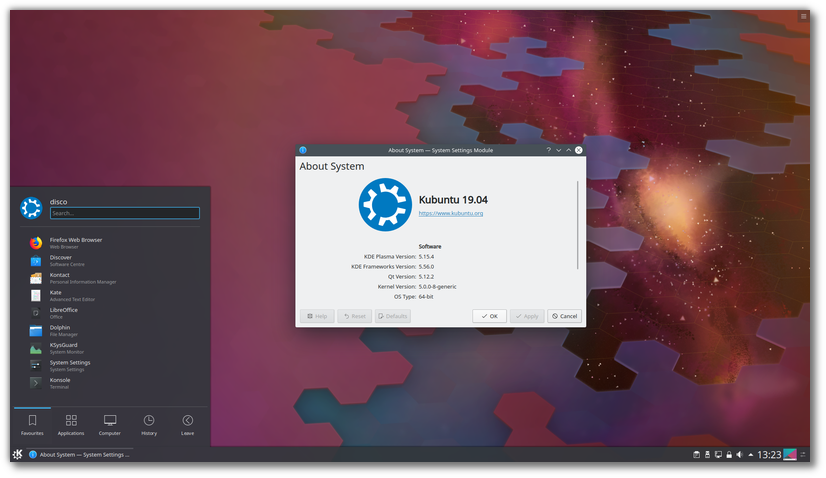
The Kubuntu team has published Kubuntu 19.04, a new release which ships with KDE Plasma 5.15, Qt 5.12 and Linux 5.0. The new version includes nine months of security updates. The release announcement states: "Kubuntu 19.04 has been released, featuring the beautiful Plasma 5.15 desktop from the KDE community. Code-named Disco Dingo, Kubuntu 19.04 continues our proud tradition of integrating the latest and greatest open source technologies into a high-quality, easy-to-use Linux distribution. The team has been hard at work through this cycle, introducing new features and fixing bugs. Under the hood, there have been updates to many core packages, including a new 5.00-based kernel, Qt 5.12, KDE Frameworks 5.56, Plasma 5.15.4, and KDE Applications 18.12.3. Kubuntu has seen some exciting improvements, with newer versions of Qt, updates to major packages like Krita, KDE Connect, Kstars, Latte-dock, Firefox and LibreOffice, and stability improvements to KDE Plasma. For a list of other application updates, upgrading notes and known bugs be sure to read our release notes." Download: kubuntu-19.04-desktop-amd64.iso (1,827MB, SHA256, signature, torrent, pkglist). Also available from OSDisc.

Lubuntu 19.04 "Disco Dingo".

Lubuntu 19.04 “Disco Dingo”.

The Lubuntu team has published a new version of their distribution. Lubuntu 19.04 provides nine months of support and ships with version 0.14.1 of the LXQt desktop environment. Unlike most other community flavours of Ubuntu which use the Ubiquity installer, Lubuntu uses the Calamares system installer. "This is the second Lubuntu release with LXQt as the main desktop environment. The Lubuntu project, in 18.10 and successive releases, will no longer support the LXDE desktop environment or tools in the Ubuntu archive, and will instead focus on the LXQt desktop environment. You can find the following major applications and toolkits installed by default in this release: LXQt 0.14.1; Qt 5.12.2; Mozilla Firefox 66, which will receive updates from the Ubuntu Security Team throughout the support cycle of the release; the LibreOffice 6.2.2 suite, with the Qt 5 frontend; VLC 3.0.6, for viewing media and listening to music; Featherpad 0.9.3, for notes and code editing; Discover Software Center 5.15.4, for an easy, graphical way to install and update software; the powerful and fast email client Trojitá 0.7 to get you to inbox zero in no time." 

Info: release announcement. 


Download: lubuntu-19.04-desktop-amd64.iso (1,580MB, SHA256, signature, torrent, pkglist). Also available from OSDisc.


Xubuntu 19.04 "Disco Dingo".


Xubuntu 19.04 “Disco Dingo”.


Xubuntu developers have announced the release of Xubuntu 19.04. The new version ships with version 5.0 of the Linux kernel and provides nine months of support. This release ships with some components from Xfce's development branch to improve the desktop experience. The project's release announcementstates: "Highlights: Xubuntu 19.04 features a wide range of bug fixes for issues identified in previous releases, many of which have already been backported to the stable releases. AptURL, The GIMP, and LibreOffice Impress have been included to provide a more complete and user-friendly desktop experience. New keyboard shortcuts make it easier and faster to get work done. Shift + Print Screen will capture a screenshot for a specified region. Press F4 in Thunar to open a terminal window in the current path, or press Ctrl + Shift + F to search for files. Many Xfce 4.13 components have been added or updated, providing an updated snapshot of Xfce 4.14 development." 

Info: release notes. 

Download: xubuntu-19.04-desktop-amd64.iso(1,517MB, SHA256, signature, torrent, pkglist). Also available from OSDisc

Ubuntu Kylin 19.04 "Disco Dingo".


Ubuntu Kylin19.04 “Disco Dingo”.
The team behind Ubuntu Kylin has published a new version of their distribution which introduces a new visual style. The project's new release, Ubuntu Kylin 19.04, introduces transparency effects to the application menu, adds a preview function to the file manager and provides nine months of support. "In April 19th, 2019, We are glad to announce the official release of open source operating system Ubuntu Kylin 19.04 (Disco Dingo). In this version, OS stability is our first goal to obtain. In order to provide a better experience for users, a series of improvements are made on system kernel, basic service, desktop environment and specialized apps. In addition, other open source distribution such as Ubuntu 19.04、Lubuntu 19.04 and Ubuntu Mate 19.04 are released in the same time. We are bringing a whole new visual experience in this distribution, from system choice, boot up animation, log in program to system desktop, a unified style is presented. Amazing transparency effect is utilized on start menu, taskbar and notification area, give your desktop a sense of technology. Practical functions are provided to simplify your daily operations." 

Info: Chinese, English). 

Download: ubuntukylin-19.04-desktop-amd64.iso (2,195MB, SHA256, signature, torrent, pkglist).

Random Posts

I miei preferiti in Instagram

Archivio