-->

Guida a Pinta validissimo editor grafico gratuito e open source: installazione.

Installazione di Pinta
Pinta può essere installato su Linux, Mac, Windows o * BSD. Per questo motivo, esistono diversi modi per installare Pinta in base a ciò che si sta utilizzando come sistema operativo.

Questo documento ti mostrerà i diversi modi per installare Pinta.

Installazione di Pinta su Ubuntu
Installa Pinta dal repository Ubuntu predefinito
Pinta è disponibile nel repository Ubuntu predefinito. Puoi installarlo usando:

Fare clic su Ubuntu Software Center da Launcher (pannello icona sito sinistro).
Nella casella di input in alto a destra digitare: Pinta e premere Invio.
Pinta viene visualizzato sotto l'elenco. Fare clic su di esso e fare clic sul pulsante Installa.
Ma Pinta dal repository Ubuntu predefinito può essere una versione precedente, quindi potresti voler installare una versione più recente di Pinta dal repository PPA dei manutentori di Pinta. Vedi sotto.

Installa Pinta dal repository PPA dei manutentori di Pinta utilizzando l'interfaccia utente grafica (per i principianti)
Il software nel repository Ubuntu predefinito può non essere aggiornato. I manutentori di Pinta offrono versioni più recenti nel repository di software denominato PPA. In Ubuntu è molto semplice aggiungere un nuovo PPA agli elenchi dei repository software per installare nuovo software o fornire aggiornamenti di sistema.

Fare clic su Ubuntu Software Center da Launcher (pannello icona sito sinistro).
Dal menu Modifica, fare clic su Sorgenti software.
Fai clic sulla scheda Altro software.
Nella parte inferiore della finestra di dialogo fai clic sul pulsante Aggiungi.
Incolla: deb http://ppa.launchpad.net/pinta-maintainers/pinta-daily/ubuntu ubuntu_version main
Nota: invece di ubuntu_version usare: preciso per Ubuntu 12.04, fidato per Ubuntu 14.04, utopico per Ubuntu 14.10 o vivido per Ubuntu 15.04.
Fare clic sul pulsante Chiudi, quindi nella casella di input in alto a destra digitare Pinta e dall'applicazione elencata fare clic sul pulsante Installa nel programma Pinta.
Installa Pinta dal repository PPA dei manutentori di Pinta usando il terminale (per utenti esperti)
Terminale aperto con CTRL + ALT + T Aggiungi repository PPA stabile Pinta:

sudo add-apt-repository ppa: pinta-maintainers / pinta-stable

Nota: invece di pinta-stabile è possibile aggiungere pinta ogni giorno se si desidera testare Pinta più recente e più grande, ma potrebbe essere difettoso.

Aggiorna gli elenchi dei pacchetti di sistema:

sudo apt-get update

Installa Pinta:

sudo apt-get install pinta

Installazione di Pinta su * BSD
FreeBSD e DragonFly BSD
Pinta è disponibile nelle porte BSD FreeBSD e DragonFly.

Puoi installare il pacchetto binario usando:

sudo pkg installa pinta

o compilarlo usando:

cd / usr / doors / graphics / pinta && sudo rendono l'installazione pulita

OpenBSD
Pinta è disponibile nelle porte OpenBSD.

Puoi installare il pacchetto binario usando:

sudo pkg_add pinta

o compilarlo usando:

cd / usr / doors / graphics / pinta && sudo make install

Usando il Tarball
Un tarball è come un file ZIP. È un singolo file con molti file al suo interno. Come un file ZIP, deve essere estratto prima di poter utilizzare i file in essi contenuti.

Innanzitutto, devi scaricare il tarball. Vai alla pagina di download e fai clic sul collegamento Download in Tarball. Scarica il file dove vuoi, assicurati di ricordare dove.

In secondo luogo, dobbiamo estrarlo. Puoi utilizzare il mouse per fare clic con il pulsante destro del mouse sul file Tarball e selezionare "Estrai qui" oppure puoi utilizzare il terminale se ti senti più a tuo agio.

Ecco il comando per estrarre i file tramite il terminale, assicurati di trovarti nella stessa cartella del tarball:

Guida introduttiva di Chrome: modifica delle impostazioni relative a immagini, JavaScript e altri contenuti web.

Puoi scegliere la modalità con cui Chrome gestisce cookie, immagini e plug-in nelle impostazioni relative ai contenuti.


Queste impostazioni controllano quali contenuti i siti web possono presentarti e quali informazioni possono utilizzare durante la tua esplorazione.


Su un computer.

Per aprire le impostazioni di Chrome relative ai contenuti da un computer, procedi nel seguente modo:

Nell'angolo in alto a destra della finestra del browser, fai clic sul menu Chrome Chrome menu.


Seleziona Impostazioni.


Fai clic su Mostra impostazioni avanzate in basso.

Fai clic sul pulsante Impostazioni contenuti nella sezione "Privacy".


google-chrome-wallpaper_thumb2

Tra le novitá di Ubuntu 19.10 Eoan Ermine il meglio di GNOME e una velocitá di avvio piú rapida.

Ubuntu 19.10 è pronta per il download.  Insieme alle sue derivate ufficiali.

Ma non solo. Il kernel di Linux 5.3 è al centro di Eoan Ermine. Oltre alle solite prestazioni, questo aggiornamento del kernel include anche:

  Supporto iniziale per AMDGPU Navi, incluso Radeon RX 5700
  16 milioni di nuovi indirizzi IPv4
  Supporto display Intel HDR per Icelake, Geminilake
  Calcola il supporto dello shader nel driver Broadcom V3D
  Supporto migliorato per NVIDIA Jetson Nano
  Supporto tastiera MacBook e MacBook Pro
  Supporto per processori Zhaoxin x86
  SWAP file nativo in F2FS
  EXT4 Miglioramenti della velocità per ricerche senza distinzione tra maiuscole e minuscole


La toolchain di Ubuntu è stata aggiornata per includere le ultime versioni upstream di:

glibc 2.30
  OpenJDK 11
  GC 9.2
  Python 3.7.5 (+ interprete Python 3.8.0)
  Rubino 2.5.5
  PHP 7.3.8
  Perl 5.28.1
  golang 1.12.10
Neat-o!

Ecco tutti i download:

Ubuntu 19.10 “Eoan Ermine”.

Download (pkglist): ubuntu-19.10-desktop-amd64.iso (2,349MB, SHA256, signature, torrent), ubuntu-19.10-live-server-amd64.iso (843MB, SHA256, signature, torrent).

Lightworks il pacchetto completo per la creazione di video in Linux.

Per oltre 25 anni l'editore di Lightworks è stato in prima linea nell'editing cinematografico, essendo stato utilizzato in molti dei migliori film della storia del cinema: The Wolf of Wall Street, LA Confidential, Pulp Fiction, Heat, Road to Perdition, Hugo, The King's Discorso e molti altri!

Ora con il rilascio di Lightworks v14.5 Lightwork ha creato il pacchetto creativo completo per i video in modo che tutti possano realizzare video che si distinguono dalla massa.+

Sia che tu debba realizzare video per i social media, YouTube o per un progetto cinematografico 4K, Lightworks rende tutto possibile!

Lightworks viene caricato con queste incredibili funzionalità:

Interfaccia utente semplice e intuitiva
Accedi a incredibili contenuti audio e video royalty-free

Facile modifica e taglio della sequenza temporale
Flussi di lavoro proxy Lo-Res per 4K

FX audio e video pronti all'uso in tempo reale
Esporta video per YouTube / Vimeo, SD / HD, fino a 4K

Ampio supporto per formati di file, inclusi supporti con frame rate variabile
Valuta la sequenza utilizzando professionalmente fino a 32 bit di precisione GPU e strumento per istogrammi.

Tutto ciò di cui hai bisogno per distinguerti dalla massa

E se avessi il potere di un software di editing video pluripremiato da Academy ed Emmy in un pacchetto semplice da usare per creare i tuoi capolavori video? Sii fantastico vero? Bene con Lightworks puoi modificare come un professionista e liberare il tuo potenziale creativo per tutti.

Lightworks UI

Interfaccia utente semplice e intuitiva Mantienitiveloce e facilmente creando contenuti incredibili; non potrebbe essere più semplice con tutti gli strumenti necessari facilmente accessibili direttamente dalla timeline. E con una vasta serie di video tutorial che coprono tutto ciò che devi sapere e una community di utenti per aiutarti con ogni domanda, ti faremo modificare in pochissimo tempo.

Lightworks Licences

Fotoritocco per tuttiPer coloro che hanno appena iniziato a realizzare video, Lightworks offre una versione di licenza GRATUITA con tutti gli strumenti: l'unica limitazione è sui formati di output . La licenza di Lightworks Pro può essere acquistata secondo necessità; andare mensilmente, annualmente o ottenere la licenza definitiva, che include i pacchetti Boris Graffiti e FX.

Lightworks User Interface

Effetti straordinari e supporti esenti da royaltySia che cerchi ispirazione o semplicemente per creare contenuti incredibilmente raffinati, hai accesso diretto dalla timeline di modifica a oltre 100 FX inclusi e alla migliore musica di produzione e video stock originale da Audio Network e Pond5.

Export Formats Diagram

Distribuire contenuti in qualsiasi formatoQualunque sia la piattaforma o il formato finale a cui è necessario distribuire il video, Lightworks è coperto. Da Facebook, Vimeo e YouTube, a SD, HD, 4K e oltre, i produttori di video possono creare pacchetti di video per tutti.
Formati di esportazione: Nero = Licenza gratuita / Rosso = Licenza Pro

Immagine del grande schermo che mostra tutti i film e link agli utenti di hollywood ecc

Sul grande schermoCon Lightworks sei in buona compagnia quando si tratta di creare contenuti straordinari. Dai classici successi ai capolavori cinematografici, hai tra le mani il montaggio di Hollywood !

Download per Linux a 64 bits.

Download iconDownload DEB
Download iconDownload RPM

Ultima beta:
14.6 revisione 115357

Data di rilascio:
28 giu 2019

Canonical annuncia il nome in codice della prossima versione di Ubuntu, si chiamerà "Eoan Ermine".

Canonical ha annunciato il nome in codice completo della prossima versione di Ubuntu.
Ubuntu 19.10 si chiamerà "Eoan Ermine".

Sarà dunque un ermellino l'animale totem di Ubuntu 19.10. Eoan, secondo il dizionario inglese, è invece un aggettivo che significa "relativo all'alba" o “relativo all'est” secondo alcune varianti.

Questa volta non è Mark Shuttleworth nel suo blog a svelare il nome in codice.


Eoan Ermine è presente nella Daily Build della versione cinese di Ubuntu (Kylin) o poi nelle altre derivate ufficiali.

Mark Shuttleworth si stacca definitivamente del progetto Ubuntu?

Canonical ha appena rilasciato l'ultima versione di Ubuntu 19.04 "Disco Dingo" e derivate ufficiali.

Canonical ha appena rilasciato l'ultima versione di Ubuntu, una delle distribuzioni Linux più utilizzate in assoluto.

Questa nuova versione è molto importante per gli utenti GNOME poiché porta con se GNOME 3.32 che offre agli utenti diverse ottimizzazioni che rendono GNOME più prestante.

Accanto a questo troviamo le personalizzazioni grafiche offerte da Ubuntu che comprendono un nuovo tema (icone e GTK) e le tre estensioni per GNOME Shell che rendono l'interfaccia utente di Ubuntu 19.04 simile a quella di Unity.
Canonical ha appena rilasciato l'ultima versione di Ubuntu, una delle distribuzioni Linux più utilizzate in assoluto.

I cambiamenti in Ubuntu 19.04 "Disco Dingo".


Nota anche come Disco Dingo, Ubuntu 19.04 LTS solidifica alcuni cambiamenti principali effettuati su Ubuntu 18.10, come ad esempio l'uso del nuovo ambiente desktop GNOME.

Ecco tutti i download via Distrowatch:

Ubuntu 19.04 “Disco Dingo”.

Ubuntu 19.04 “Disco Dingo”.

Martin Wimpress has announced the launch of Ubuntu MATE 19.04 which ships with version 1.20 of the MATE desktop and updated video drivers. "Ubuntu MATE 19.04 is shipping with MATE Desktop 1.20. Albeit, the latest maintenance release of MATE Desktop 1.20 with some of the bug fixes and new features from MATE Desktop 1.22 included. In fact, the version of MATE Desktop being shipped in 19.04 is derived from the same MATE packages that will feature in the upcoming Debian 10 (Buster) release. You may be wondering why we're not shipping MATE Desktop 1.22? The answer: stability. MATE Desktop 1.22 introduces some underlying API changes in core components and while all first party MATE Desktop applications are compatible with the changes and completely stable, some third party applications are not. Some third party applications are big crashers now and we've not been able to fix them in time. So, we are playing it safe and sticking with MATE Desktop 1.20 and working with upstreams so we can land MATE Desktop 1.22 early in the Ubuntu MATE 19.10 development cycle."

Info: release announcementand in the Ubuntu release notes.

Download: ubuntu-mate-19.04-desktop-amd64.iso (1,988MB, SHA256, signature, torrent, pkglist). Also available from OSDisc.


Ubuntu Mate 19.04 “Disco Dingo”.

Ubuntu Mate 19.04 “Disco Dingo”.


Adam Conrad has announced the release of Ubuntu 19.04, codename "Disco Dingo". The new release ships with GNOME 3.32, version 5.0 of the Linux kernel, and offers fractional scaling through both X.Org and Wayland desktop sessions. "Codenamed "Disco Dingo", 19.04 continues Ubuntu's proud tradition of integrating the latest and greatest open source technologies into a high-quality, easy-to-use Linux distribution. The team has been hard at work through this cycle, introducing new features and fixing bugs. The Ubuntu kernel has been updated to the 5.0 based Linux kernel, our default toolchain has moved to gcc 8.3 with glibc 2.29, and we've also updated to openssl 1.1.1b and gnutls 3.6.5 with TLS1.3 support. Ubuntu Desktop 19.04 introduces GNOME 3.32 with increased performance, smoother startup animations, quicker icon load times and reduced CPU+GPU load. Fractional scaling for HiDPI screens is now available in Xorg and Wayland."

Info: release announcement and in the release notes.

Download (pkglist): ubuntu-19.04-desktop-amd64.iso (2,000MB, SHA256, signature, torrent), ubuntu-19.04-live-server-amd64.iso (748MB, SHA256, signature, torrent).

Ubuntu Studio 19.04 “Disco Dingo”.

Ubuntu Studio 19.04 “Disco Dingo”.


The Ubuntu Studio team has published a new release, Ubuntu Studio 19.04. The new release is supported for nine months and ships with a new audio plugin host called Carla. "Officially released on April 15, 2019, Carla 2.0.0 has been added to Ubuntu Studio to replace the outdated jack-rack and add more functionality. Carla is an audio plugin host that can handle many different types of plugins, from Ladspa to DSSI to LV2 to VST. In fact, if you install the WINE bridge (not installed by default), Carla can host Windows-compiled VST plugins. Carla can also act as a plugin itself, allowing your DAW to use any audio plugin. Carla also includes a patchbay, which is functionally similar to that of Patchage. Ubuntu Studio Controls has been upgraded to 1.7 with many bugfixes, and is now the preferred method for starting Jack. As such, we ask that you discontinue use of QJackCtl for starting Jack. QJackCtl remains a good way to monitor Jack’s performance and logs."

Info: release announcement.

Leggi anche: Come risolvere il blocco di Ubuntu all'avvio a causa dei driver NVIDIA, ecco la guida.

Download: ubuntustudio-19.04-dvd-amd64.iso (3,132MB, SHA256, signature, torrent, pkglist). Also available from OSDisc.

Ubuntu Budgie 19.04 “Disco Dingo”.

Ubuntu Budgie 19.04 “Disco Dingo”.

The Ubuntu Budgie team has announced the release of Ubuntu Budgie 19.04 which received nine months of support. The new version includes a number of bug fixes and swaps out the Nautilus file manager for Nemo. "19.04 is supported for 9 months; our 18.04 LTS is supported for 3 years. Based on 18.04 and 18.10 experiences, feedback and suggestions that we have received from our users, the new release comes with a lot of new features, fixes and optimizations. This release is a big step towards our 20.04 LTS. Here is what you can expect with the new release: showcasing the latest Budgie desktop developments Budgie desktop v10.5 is now officially available; showcasing the latest budgie-applets available; replacing Nautilus for Nemo - retains desktop-icons capability with all the features of Nemo such as dual pane etc + integrated catfish search - lookout for our nemo-extensions in budgie-welcome recommendations; stylish reworking of our desktop together shipping a new theme QogirBudgie which can be chosen together with Pocillo and Arc; integrating all of this together with the major GNOME developments of GTK+3.24 and Mutter 3.32."

Info: release announcement and in the release notes.

Download: ubuntu-budgie-19.04-desktop-amd64.iso (1,703MB, SHA256, signature, torrent, pkglist). Also available from OSDisc.

Kubuntu 19.04 “Disco Dingo”.


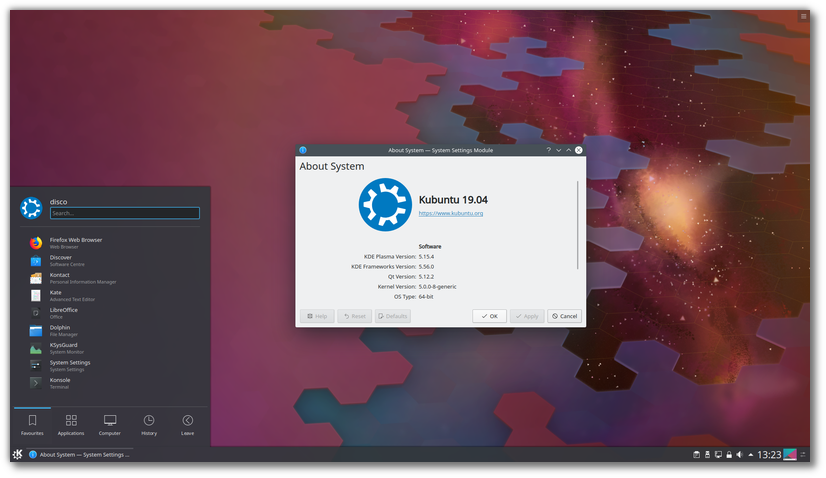
The Kubuntu team has published Kubuntu 19.04, a new release which ships with KDE Plasma 5.15, Qt 5.12 and Linux 5.0. The new version includes nine months of security updates. The release announcement states: "Kubuntu 19.04 has been released, featuring the beautiful Plasma 5.15 desktop from the KDE community. Code-named Disco Dingo, Kubuntu 19.04 continues our proud tradition of integrating the latest and greatest open source technologies into a high-quality, easy-to-use Linux distribution. The team has been hard at work through this cycle, introducing new features and fixing bugs. Under the hood, there have been updates to many core packages, including a new 5.00-based kernel, Qt 5.12, KDE Frameworks 5.56, Plasma 5.15.4, and KDE Applications 18.12.3. Kubuntu has seen some exciting improvements, with newer versions of Qt, updates to major packages like Krita, KDE Connect, Kstars, Latte-dock, Firefox and LibreOffice, and stability improvements to KDE Plasma. For a list of other application updates, upgrading notes and known bugs be sure to read our release notes." Download: kubuntu-19.04-desktop-amd64.iso (1,827MB, SHA256, signature, torrent, pkglist). Also available from OSDisc.

Lubuntu 19.04 "Disco Dingo".

Lubuntu 19.04 “Disco Dingo”.

The Lubuntu team has published a new version of their distribution. Lubuntu 19.04 provides nine months of support and ships with version 0.14.1 of the LXQt desktop environment. Unlike most other community flavours of Ubuntu which use the Ubiquity installer, Lubuntu uses the Calamares system installer. "This is the second Lubuntu release with LXQt as the main desktop environment. The Lubuntu project, in 18.10 and successive releases, will no longer support the LXDE desktop environment or tools in the Ubuntu archive, and will instead focus on the LXQt desktop environment. You can find the following major applications and toolkits installed by default in this release: LXQt 0.14.1; Qt 5.12.2; Mozilla Firefox 66, which will receive updates from the Ubuntu Security Team throughout the support cycle of the release; the LibreOffice 6.2.2 suite, with the Qt 5 frontend; VLC 3.0.6, for viewing media and listening to music; Featherpad 0.9.3, for notes and code editing; Discover Software Center 5.15.4, for an easy, graphical way to install and update software; the powerful and fast email client Trojitá 0.7 to get you to inbox zero in no time." 

Info: release announcement. 


Download: lubuntu-19.04-desktop-amd64.iso (1,580MB, SHA256, signature, torrent, pkglist). Also available from OSDisc.


Xubuntu 19.04 "Disco Dingo".


Xubuntu 19.04 “Disco Dingo”.


Xubuntu developers have announced the release of Xubuntu 19.04. The new version ships with version 5.0 of the Linux kernel and provides nine months of support. This release ships with some components from Xfce's development branch to improve the desktop experience. The project's release announcementstates: "Highlights: Xubuntu 19.04 features a wide range of bug fixes for issues identified in previous releases, many of which have already been backported to the stable releases. AptURL, The GIMP, and LibreOffice Impress have been included to provide a more complete and user-friendly desktop experience. New keyboard shortcuts make it easier and faster to get work done. Shift + Print Screen will capture a screenshot for a specified region. Press F4 in Thunar to open a terminal window in the current path, or press Ctrl + Shift + F to search for files. Many Xfce 4.13 components have been added or updated, providing an updated snapshot of Xfce 4.14 development." 

Info: release notes. 

Download: xubuntu-19.04-desktop-amd64.iso(1,517MB, SHA256, signature, torrent, pkglist). Also available from OSDisc

Ubuntu Kylin 19.04 "Disco Dingo".


Ubuntu Kylin19.04 “Disco Dingo”.
The team behind Ubuntu Kylin has published a new version of their distribution which introduces a new visual style. The project's new release, Ubuntu Kylin 19.04, introduces transparency effects to the application menu, adds a preview function to the file manager and provides nine months of support. "In April 19th, 2019, We are glad to announce the official release of open source operating system Ubuntu Kylin 19.04 (Disco Dingo). In this version, OS stability is our first goal to obtain. In order to provide a better experience for users, a series of improvements are made on system kernel, basic service, desktop environment and specialized apps. In addition, other open source distribution such as Ubuntu 19.04、Lubuntu 19.04 and Ubuntu Mate 19.04 are released in the same time. We are bringing a whole new visual experience in this distribution, from system choice, boot up animation, log in program to system desktop, a unified style is presented. Amazing transparency effect is utilized on start menu, taskbar and notification area, give your desktop a sense of technology. Practical functions are provided to simplify your daily operations." 

Info: Chinese, English). 

Download: ubuntukylin-19.04-desktop-amd64.iso (2,195MB, SHA256, signature, torrent, pkglist).

Definita la data di rilascio per il ciclo di sviluppo di GNOME 3.34, beta, RC e versione finale.

Occorre essere obbiettivi e non sarà facile per gli sviluppatori superare il successo della tanto acclamata versione di GNOME 3.32, che ha portato con sé alcune patch che garantiscono prestazioni, perfezionamenti e funzionalità che rendono l'interfaccia grafica stabile e fluida.

Nuove funzionalità, nuovo tema GTK, un nuovo stile con un set di icone aggiornato, miglioramenti delle prestazioni: GNOME 3.32 è questo e tanto altro.

Però per un'istante guardiamo oltre e soffermiamoci sul programma di rilascio per il ciclo di sviluppo di GNOME 3.34, dove le tre date di riferimento di nostro interesse sono:

GNOME 3.4 definita la data di rilascio.

 La data di rilascio per GNOME 3.34

  • GNOME 3.34 Beta : 21 agosto 2019
  • Release Candidate di GNOME 3.34 : 4 settembre 2019
  • Rilascio stabile di GNOME 3.34.0 : 11 settembre 2019
Leggi anche: Come personalizzare Gnome 3 Shell, ecco 15 temi.
Si potrà notare che c'è un leggero ritardo rispetto agli anni precedenti nella data di rilascio, causato dalla concomitanza di altri eventi, come per esempio il GUADEC, cioè la conferenza degli utenti e degli sviluppatori di GNOME.
Ricerca di documenti dalla panoramica delle attività

I miglioramenti.


Al momento, essendo troppo presto, non possiamo affermare con certezza quali saranno i miglioramenti che introdurrà la prossima versione.


Comunque tra le vociferate ipotesi si parla di:

  •  ulteriori miglioramenti nelle prestazioni di Shell e Mutter, 
  • miglioramenti nelle applicazioni Foto e Musica e 
  • qualche sperimentazione sul funzionamento della schermata di messaggistica/notifica con l'utilizzo del noto programma GSconnect.

Questa versione contiene anche alcuni importanti nuovi sviluppi. 


Random Posts

I miei preferiti in Instagram

Archivio