-->

Nuovi aggiornamenti di sicurezza per Ubuntu 9.10 Karmic Koala

Nuovi aggiornamenti per Ubuntu 9.10 Karmic Koala. Fanno parte del bollettino di sicurezza settimanale rilasciato da Canonical. Insieme agli aggiornamenti ritenuti importanti ci sono altri considerati "raccomandati" e riguardano specificamente programmi installati nel nostro computer.

Come al solito se abbiamo scelto (di default) installarli automaticamente, al miglior "stile windows" comparirà una finestra con gli updates a eseguire semplicemente cliccando su Installa. Se, invece, abbiamo disattivato questa opzione, possiamo sempre installarli mnualmente con sudo apt-get update. Riguardano:
  • xserver-org
  • gdm
  • x11-common
  • xorg
  • sreadahead
  • tzdata

gdm provides the equivalent of a "login:" prompt for X displays- it pops up a login window and starts an X session.
It provides all the functionality of xdm, including XDMCP support for managing remote displays.
The greeting window is written using the GNOME libraries and hence looks like a GNOME application- even to the extent of supporting themes! By default, the greeter is run as an unprivileged user for security.

Cambiamenti per le versioni:
2.28.1-0ubuntu1
2.28.1-0ubuntu2

Scaricamento dell'elenco dei cambiamenti non riuscito.
Verificare la connessione a Internet.

sreadahead has been replaced by ureadahead, this package ensures that you are transitioned over and may be safely removed.


Cambiamenti per le versioni:
1.0-5
1:0.90.3-2

Versione 0.90.3-2:

* über-readahead is a replacement for sreadahead that should
significantly improve boot performance on rotational hard drives,
especially those that had regressed in performance from jaunty to
karmic.

It does this by pre-loading such things as ext2/3/4 inodes and opening
files in as logical order as possible before loading all blocks in one
pass across the disk.

On SSD, this behaves much as sreadahead used to, replacing that package
with slightly improved tracing code.

This requires the kernel package also found in karmic-proposed.

LP: #432089.


Versione 0.90.3-1:

* New upstream release:
- Move ext2fs inode group lookup into the tracing stage, storing the
groups to preload in the pack, rather than spending time on normal
boots working it out.
- Open files in order of inode group (or inode number on non-ext2fs),
which seems to give a benefit in load time and certainly produces
better blktrace output.
- Increase the "too old" check from a month to a year.
- Fix dump of zero-byte files to not claim a single page.
- Fix unhandled error output when given an unknown pack file.
- Don't call ureadhead for the root filesystem twice on boot (the second
time should only take a few ms, but that's still time)
- Consider exit status 4 (no pack file for given mount point) normal.
- Make uselib tracing optional.


Versione 0.90.2-1:

* New upstream release:
- improved SSD mode
- inode group preload threshold configurable by environment variable
- default inode group preload threshold changed to 16, because random
stabbing in the dark suggested it was a good number
- add a job that profiles extra mountpoints

* Remove /etc/cron.monthly/sreadahead too.
* Add an apport hook to attach a dump of the packs.


Versione 0.90.1-1:

* Bug fixes.


Versione 0.90.0-1:

* Initial release to ubuntu-boot PPA.

This package contains data required for the implementation of standard local time for many representative locations around the globe. It is updated periodically to reflect changes made by political bodies to time zone boundaries, UTC offsets, and daylight-saving rules

Cambiamenti per le versioni:
2009r-0ubuntu9.10
2009s-0ubuntu0.9.10

Versione 2009s-0ubuntu0.9.10:

* New upstream release 2009s:
- Fix a typo in Antarctica/Davis DST rules
- Fiji will use DST this year (effective from Nov 29)
- LP: #486351

über-readahead is used during boot to read files in advance of when they are needed such that they are already in the page cache, improving boot performance.
Its data files are regenerated on the first boot after install, and either monthly thereafter or when packages with init scripts or configs are installed or updated.
ureadahead requires a kernel patch included in the Ubuntu kernel.

Cambiamenti per le versioni:
None
0.90.3-2

Versione 0.90.3-2:

* über-readahead is a replacement for sreadahead that should
significantly improve boot performance on rotational hard drives,
especially those that had regressed in performance from jaunty to
karmic.

It does this by pre-loading such things as ext2/3/4 inodes and opening
files in as logical order as possible before loading all blocks in one
pass across the disk.

On SSD, this behaves much as sreadahead used to, replacing that package
with slightly improved tracing code.

This requires the kernel package also found in karmic-proposed.

LP: #432089.


Versione 0.90.3-1:

* New upstream release:
- Move ext2fs inode group lookup into the tracing stage, storing the
groups to preload in the pack, rather than spending time on normal
boots working it out.
- Open files in order of inode group (or inode number on non-ext2fs),
which seems to give a benefit in load time and certainly produces
better blktrace output.
- Increase the "too old" check from a month to a year.
- Fix dump of zero-byte files to not claim a single page.
- Fix unhandled error output when given an unknown pack file.
- Don't call ureadhead for the root filesystem twice on boot (the second
time should only take a few ms, but that's still time)
- Consider exit status 4 (no pack file for given mount point) normal.
- Make uselib tracing optional.


Versione 0.90.2-1:

* New upstream release:
- improved SSD mode
- inode group preload threshold configurable by environment variable
- default inode group preload threshold changed to 16, because random
stabbing in the dark suggested it was a good number
- add a job that profiles extra mountpoints

* Remove /etc/cron.monthly/sreadahead too.
* Add an apport hook to attach a dump of the packs.


Versione 0.90.1-1:

* Bug fixes.


Versione 0.90.0-1:

* Initial release to ubuntu-boot PPA.

über-readahead is used during boot to read files in advance of when they are needed such that they are already in the page cache, improving boot performance.
Its data files are regenerated on the first boot after install, and either monthly thereafter or when packages with init scripts or configs are installed or updated.
ureadahead requires a kernel patch included in the Ubuntu kernel.

Cambiamenti per le versioni:
None
0.90.3-2

Versione 0.90.3-2:

* über-readahead is a replacement for sreadahead that should
significantly improve boot performance on rotational hard drives,
especially those that had regressed in performance from jaunty to
karmic.

It does this by pre-loading such things as ext2/3/4 inodes and opening
files in as logical order as possible before loading all blocks in one
pass across the disk.

On SSD, this behaves much as sreadahead used to, replacing that package
with slightly improved tracing code.

This requires the kernel package also found in karmic-proposed.

LP: #432089.


Versione 0.90.3-1:

* New upstream release:
- Move ext2fs inode group lookup into the tracing stage, storing the
groups to preload in the pack, rather than spending time on normal
boots working it out.
- Open files in order of inode group (or inode number on non-ext2fs),
which seems to give a benefit in load time and certainly produces
better blktrace output.
- Increase the "too old" check from a month to a year.
- Fix dump of zero-byte files to not claim a single page.
- Fix unhandled error output when given an unknown pack file.
- Don't call ureadhead for the root filesystem twice on boot (the second
time should only take a few ms, but that's still time)
- Consider exit status 4 (no pack file for given mount point) normal.
- Make uselib tracing optional.


Versione 0.90.2-1:

* New upstream release:
- improved SSD mode
- inode group preload threshold configurable by environment variable
- default inode group preload threshold changed to 16, because random
stabbing in the dark suggested it was a good number
- add a job that profiles extra mountpoints

* Remove /etc/cron.monthly/sreadahead too.
* Add an apport hook to attach a dump of the packs.


Versione 0.90.1-1:

* Bug fixes.


Versione 0.90.0-1:

* Initial release to ubuntu-boot PPA.

x11-common contains the filesystem infrastructure required for further installation of the X Window System in any configuration; it does not provide a full installation of clients, servers, libraries, and utilities required to run the X Window System.
A number of terms are used to refer to the X Window System, including "X", "X Version 11", "X11", "X11R6", and "X11R7".
The version of X used in Debian is derived from the version released by the X.Org Foundation, and is thus often also referred to as "X.Org".
All of the preceding quoted terms are functionally interchangeable in an Debian system.


Cambiamenti per le versioni:
1:7.4+3ubuntu7
1:7.4+3ubuntu10

Versione 1:7.4+3ubuntu10:

* local/Failsafe/failsafeXServer: Since dexconf no longer produces
an xorg.conf, it will neither generate a failsafe xorg.conf, so now
we just generate one directly. Otherwise X won't start a failsafe
session properly.
(LP: #477149)


Versione 1:7.4+3ubuntu9:

* Restore 60x11-common_localhost. I dropped this before because the
file was not in git so assumed it was stray. On further review I
see this was intentionally added, just not to git, and was not stray.
(LP: #340807)
* control: Add Vcs-git tags


Versione 1:7.4+3ubuntu8:

* debian/local/Failsafe/failsafe{XServer,Xinit},
debian/x11-common.failsafe-x.upstart: convert Bulletproof-X support over
to upstart, for compatibility with gdm in karmic. LP: #474806.
* debian/rules: install the new upstart job with dh_installinit.
* debian/control: bump the debhelper versioned build-dependency for the
same

Cambiamenti per le versioni:
1:7.4+3ubuntu7
1:7.4+3ubuntu10

Versione 1:7.4+3ubuntu10:

* local/Failsafe/failsafeXServer: Since dexconf no longer produces
an xorg.conf, it will neither generate a failsafe xorg.conf, so now
we just generate one directly. Otherwise X won't start a failsafe
session properly.
(LP: #477149)


Versione 1:7.4+3ubuntu9:

* Restore 60x11-common_localhost. I dropped this before because the
file was not in git so assumed it was stray. On further review I
see this was intentionally added, just not to git, and was not stray.
(LP: #340807)
* control: Add Vcs-git tags


Versione 1:7.4+3ubuntu8:

* debian/local/Failsafe/failsafe{XServer,Xinit},
debian/x11-common.failsafe-x.upstart: convert Bulletproof-X support over
to upstart, for compatibility with gdm in karmic. LP: #474806.
* debian/rules: install the new upstart job with dh_installinit.
* debian/control: bump the debhelper versioned build-dependency for the
same

Cambiamenti per le versioni:
1:7.4+3ubuntu7
1:7.4+3ubuntu10

Versione 1:7.4+3ubuntu10:

* local/Failsafe/failsafeXServer: Since dexconf no longer produces
an xorg.conf, it will neither generate a failsafe xorg.conf, so now
we just generate one directly. Otherwise X won't start a failsafe
session properly.
(LP: #477149)


Versione 1:7.4+3ubuntu9:

* Restore 60x11-common_localhost. I dropped this before because the
file was not in git so assumed it was stray. On further review I
see this was intentionally added, just not to git, and was not stray.
(LP: #340807)
* control: Add Vcs-git tags


Versione 1:7.4+3ubuntu8:

* debian/local/Failsafe/failsafe{XServer,Xinit},
debian/x11-common.failsafe-x.upstart: convert Bulletproof-X support over
to upstart, for compatibility with gdm in karmic. LP: #474806.
* debian/rules: install the new upstart job with dh_installinit.
* debian/control: bump the debhelper versioned build-dependency for the
same

This package depends on the full suite of output drivers for the X.Org X server (Xorg).
It does not provide any drivers itself, and may be removed if you wish to only have certain drivers installed.


Cambiamenti per le versioni:
1:7.4+3ubuntu7
1:7.4+3ubuntu10

Versione 1:7.4+3ubuntu10:

* local/Failsafe/failsafeXServer: Since dexconf no longer produces
an xorg.conf, it will neither generate a failsafe xorg.conf, so now
we just generate one directly. Otherwise X won't start a failsafe
session properly.
(LP: #477149)


Versione 1:7.4+3ubuntu9:

* Restore 60x11-common_localhost. I dropped this before because the
file was not in git so assumed it was stray. On further review I
see this was intentionally added, just not to git, and was not stray.
(LP: #340807)
* control: Add Vcs-git tags


Versione 1:7.4+3ubuntu8:

* debian/local/Failsafe/failsafe{XServer,Xinit},
debian/x11-common.failsafe-x.upstart: convert Bulletproof-X support over
to upstart, for compatibility with gdm in karmic. LP: #474806.
* debian/rules: install the new upstart job with dh_installinit.
* debian/control: bump the debhelper versioned build-dependency for the
same


Se ti è piaciuto l'articolo , iscriviti al feed cliccando sull'immagine sottostante per tenerti sempre aggiornato sui nuovi contenuti del blog:



Ultimi post pubblicati

Vacanze    TUI.it

Universo Linux

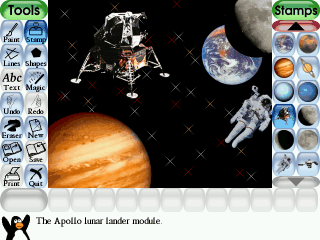
Tux Paint pratico programma per il disegno, open source, rivolto ai più piccoli (dai 3 ai 12 anni)

Tux Paint è un pratico programma per il disegno, gratuito, rivolto ai più piccoli (dai 3 ai 12 anni).

Tra le incredibili caratteristiche di Tux Paint troviamo:

- Pennello: diversi pennelli e colori disponibili;
- Timbri di gomma: immagini già pronte possono riportare del testo descrittivo e dei suoni;
- Strumento linea;
- Strumento forma: inserisce o elimina diversi colori;
- Strumento testo: diversi caratteri e dimensioni disponibili;
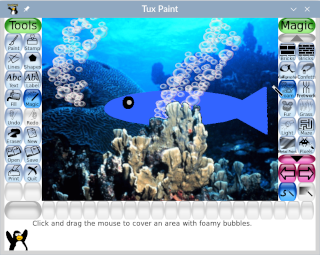
- Strumento effetti speciali (magic) con le seguenti funzioni: specchio, inverti, sfumatura, mattoni, negativo, arcobaleno, gessetto, gocce, scintille, schiarisci, riempi e sbavatura;
- Cancellino/gomma;
- Opzione annulla.

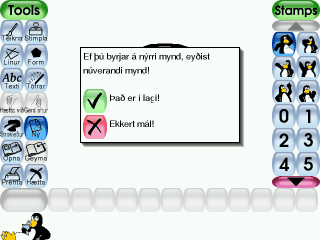
Tux Paint ha un’interfaccia completamente grafica che permette ai vostri figli di utilizzare tutti i comandi disponibili.

Il programma offre delle opzioni di configurazione rivolte ai genitori, come la modalità a tutto schermo, per far sì che il bambino non possa accedere ad altre risorse del computer, gli effetti acustici possono essere disattivati come anche i comandi della stampante e di uscita.

E’ un programma multipiattaforma, nato per Linux, che funziona molto bene anche in Windows, è un software libero, rilasciato come OpenSource, sottostante i termini della (GNU General Public License). Questo significa che potete scaricalo e installarlo su quante macchine desiderate, copiarlo e distribuirlo ad amici e parenti, e darlo alla vostra scuola locale. È da poco uscita la nuova release di Tuxpaint, la 9.16, che aggiunge nuove funzionalità tra cui i pennelli animati, divertenti commenti sonori stereo e una più ricca fornitura di timbri (ossia di immagini già pronte da inserire nelle creazioni).

Esistono varie versioni di Tuxpaint da scaricare, ce n’è una pensata per coloro che preferiscono non usare un programma eseguibile per poi procedere all’installazione nel proprio Pc. È composta infatti da un archivio estraibile che, una volta scompattato, non installa direttamente il programma, ma origina una cartella che contiene tutti i file necessari per l’esecuzione. Questa versione comprende anche i “timbri”, cioè le clipart che tanto piacciono ai bambini, da inserire nei disegni.

Il programma è semplice ma ricco di funzionalità, è gratis e piace molto ai bambini che, dopo averlo provato, difficilmente ritornano a Paint!

L'ultima versione stabile rilasciata è la 0.9.21 del 31/07/2009 e puoi scaricarla gratuitamente da questa pagina (è molto leggero, pesa solo 10,3 mb) oppure puoi chiedere il CD al costo di solo € 6,99.

Screenshots in altre lingue e istruzioni per il download in questa pagina.


Screenshots


Se ti è piaciuto l'articolo , iscriviti al feed cliccando sull'immagine sottostante per tenerti sempre aggiornato sui nuovi contenuti del blog:


Ultimi post pubblicati

Vacanze    TUI.it

Universo Linux


FuzzyOCR è un plugin molto utile specie contro le nuove tattiche ideate dagli spammer

FuzzyOcr è un plugin di spamassassinspamassassin grazie al quale è possibile individuare determinate parole all' interno di una gif

E' molto utile specie contro le nuove tattiche ideate dagli spammer, quelle in cui viene mandata una mail dal testo apparentemente "innocente" e in cima, a metà, o al fondo, viene applicata una bella immagine (nel 90% dei casi una gif) contenente della pubblicità.

In questo caso spamassassinspamassassin può fare ben poco contro questo tipo attacco appunto perchè si limita ad esaminare la mail e non l' allegato. A questo punto entra in gioco il nostro pluginplugin che esaminerà l' allegato e se troverà certi termini pre-impostati lo segnalerà come spam.

L' installazione è abbastanza semplice, si deve tenere presente però che vi sono dei requisiti da soddisfare affinchè tutto funzioni per il meglio.


Prerequisiti

Sono necessari i seguenti pacchetti per l' installazione di FuzzyOcr:

[1]SpamAssassin, versione 3.1.4 o superiore
[2]NetPBM Tools, preferibilmente la versione 10.xx o superiore
[3]ImageMagick
[4]GifLib/Libungif
[5]Gocr, preferibilmente la versione 0.40

ed infine, un modulo perl

[6]String::Approx

Installazione

Scaricate il pacchetto (consiglio la versione stable) da questo link

Unzippate il paccetto precedentemente scaricato

Copiate i files FuzzyOcr.cf e FuzzyOcr.pm in /etc/mail/spamassassin

Date uno sguardo al file FuzzyOcr.cf con il vosto editor preferito e abbiate cura di modificare eventuali path che nel vostro sistema risultano differenti.

Preparate il file FuzzyOcr.words (sempre nella directory /etc/mail/spamassassin) all' interno del quale scrivete le parole che devono essere indentificate all' inteno della gif (c'è già un file FuzzyOcr.words.sample che contiene un buon numero di parole: se volete, potete usare quello avendo cura di rinominarlo in FuzzyOcr.words)

Configurazione

Diamo uno sguardo ad alcune voci riportate nel file di configurazione FuzzyOcr.cf:

focr_verbose 2 setta il livello di log (consigliato a 2) Deve essere "scommentato"

focr_logfile /etc/mail/spamassassin/FuzzyOcr.log path del file di log.Deve essere "scommentato"

focr_global_wordlist /etc/mail/spamassassin/FuzzyOcr.words percorso del file che contiene le parole da rintracciare. Deve essere "scommentato"

focr_scansets $gocr -i -, $gocr -l 180 -d 2 -i - è la modalità con cui eseguirà lo scan. Deve essere "scommentato"

Il resto della configurazione andrebbe analizzato in base alle singole esigenze di ciascuno. Per tanto commentate e/o scommentate le voci che ritenete opportune.

Un parametro invece, a mio avviso fondamentale, è:

focr_enable_image_hashing 1

Naturalmente oltre a questo parametro, per poter utilizzare questa funzionalità occorre abilitare anche:

focr_digest_db /tmp/FuzzyOcr.hashdb (il file che userà come db)

focr_hashing_learn_scanned 1

Questi parametri permettono di abilitare una specie di database (su file in realtà) dove vengono memorizzate tutte le immagini precedentemente segnalate come spam. Quando FuzzyOcr è in dubbio se classificarla come spam o meno, controlla in questo file se è già presente o meno e nel caso affermativo la contrassegnerà come spam viceversa, la lascierà passare.

Ora che avete terminato la configurazione, potete riavviare spamassassin.

Se ti è piaciuto l'articolo , iscriviti al feed cliccando sull'immagine sottostante per tenerti sempre aggiornato sui nuovi contenuti del blog:


Ultimi post pubblicati

Vacanze    TUI.it

Universo Linux

Ubuntu 9.10 Karmic Koala: tutti i programmi dedicati al web software, seconda puntata

Tutti i programmi dedicati al web software presenti nella nuova release targata Ubuntu: Karmic Koala.

In questa seconda puntata dal navigatore più popolare GreaseMonkey a IceWeasel ad altri un po' meno conosciuti ma non meno validi come abrowser ed altri comandi e utility.

Un Web server non è altro che un software installato in un server con la funzione di elaborare pagine web e generare dinamicamente contenuti.

Le semplici pagine .htm non necessitano di particolari interventi da parte del Web server, il loro codice viene interpretato dal browser del computer client e per questo l'html è definito come un linguaggio client side. Le pagine .php o .asp, contengono dei codici destinati a produrre dei comportamenti e a generare dinamicamente html, perchè ciò sia possibile è necessaria la mediazione di un Web server; PHP e ASP vengono quindi definiti linguaggi server side.

Esemplificando, quando si invia ad un Web server la richiesta di una pagina .htm, statica, esso:
  1. riconosce la richiesta
  2. cerca e, se presente, trova la pagina nel computer server
  3. invia la pagina al browser.
Nel caso di una pagina dinamica, invece, il Web server:
  1. riconosce la richiesta
  2. cerca e trova la pagina all'interno del server Web
  3. esegue le istruzioni contenute all'interno del codice producendo dinamicamente contenuti
  4. invia la pagina browser.
La differenza salta immediatamente agl'occhi.


gallery (1.5.9-1.2ubuntu1) [universe]
a web-based photo album written in php
gallery2 (2.3-1ubuntu1) [universe]
web-based photo album written in PHP
gearman (0.10-2) [universe]
A distributed job queue
gearman-job-server (0.10-2) [universe]
Job server for the Gearman distributed job queue
gears (0.5.32.0~svn3391+dfsg-0ubuntu1) [universe]
Browser extension that enables more powerful web applications
glpi (0.71.6-1) [universe]
IT and Asset management software
Gollem è un file manager che permette agli utenti di gestire in maniera più che completa un file system gerarchico.
Gollem è un file manager web based che permette agli utenti di gestire in maniera più che completa un file system gerarchico che sia immagazzinato in una varietà di backends come in un database SQL, in un file system reale o server FTP.

Il prodotto sviluppato da Horde, un'organizzazione che ha lo scopo di produrre applicazioni open source di alta qualità, utilizza l'Horde MIME_Viewer framerwork per individuare i diversi tipi di file, eseguire l'associazione delle icone ed altre attività.

gosa (2.5.19-1) [universe]
Web Based LDAP Administration Program
gosa-desktop (2.5.19-1) [universe]
Desktop integration for GOsa
gosa-help-de (2.5.19-1) [universe]
German online help for GOsa
gosa-help-fr (2.5.19-1) [universe]
French online help for GOsa
gosa-help-nl (2.5.19-1) [universe]
Dutch online help for GOsa
gosa-schema (2.5.19-1) [universe]
LDAP schema for GOsa
gracie (0.2.8-1ubuntu1) [universe]
OpenID server for local PAM accounts
greasemonkey (0.8.20090123.1-0ubuntu3) [universe]
firefox extension that enables customization of webpages with user scripts
gtml (3.5.4-2) [universe]
An HTML pre-processor
hiki (0.8.7-3) [universe]
Wiki Engine written in Ruby
hindent (1.1.2-8) [universe]
Reformats HTML code
hobix (0.5~svn20070319-4) [universe]
flexible generation of static blogs
horde-sam (0.1+cvs20080316-1) [universe]
spam module for Horde Framework
horde3 (3.3.4+debian0-1) [universe]
horde web application framework
hsc (0.934-1ubuntu2) [universe]
html sucks completely, a developer tool for HTML projects
htcheck (1:1.2.4~rc1-1ubuntu1) [universe]
Utility for checking web site for dead/external links
htcheck-php (1:1.2.4~rc1-1ubuntu1) [universe]
Simple php interface to database generated by ht://Check
htdig (1:3.2.0b6-8) [universe]
web search and indexing system - binaries
html2text (1.3.2a-14)
advanced HTML to text converter
html2wml (0.4.11-1) [universe]
converts HTML pages to WML (WAP) or i-mode pages
htmldoc (1.8.27-4)
HTML processor that generates indexed HTML, PS, and PDF
htmldoc-common (1.8.27-4)
Common arch-independent files for htmldoc
htp (1.16-3) [universe]
An HTML pre-processor
httperf (0.9.0-1) [universe]
An HTTP server performance tester
httrack (3.43.5-1ubuntu1) [universe]
Copy websites to your computer (Offline browser)
hypermail (2.2.0.dfsg-2) [universe]
Create HTML archives of mailing lists
iceape (1.1.17+nobinonly-0ubuntu1) [universe]
dummy upgrade package for the SeaMonkey Internet Suite
iceape-browser (1.1.17+nobinonly-0ubuntu1) [universe]
dummy upgrade package for SeaMonkey Navigator
iceape-calendar (1.1.17+nobinonly-0ubuntu1) [universe]
dummy upgrade package for SeaMonkey Navigator
iceape-dbg (1.1.17+nobinonly-0ubuntu1) [universe]
dummy upgrade package for SeaMonkey Debug package
iceape-dev (1.1.17+nobinonly-0ubuntu1) [universe]
dummy upgrade package for SeaMonkey SDK
iceape-dom-inspector (1.1.17+nobinonly-0ubuntu1) [universe]
dummy upgrade package for the DOM Inspector for the SeaMonkey Internet Suite
iceape-gnome-support (1.1.17+nobinonly-0ubuntu1) [universe]
dummy upgrade package for SeaMonkey Gnome Support
icedtea-gcjwebplugin (1.0-1ubuntu4) [universe]
Java plugin based on IcedTea and gcjwebplugin (transitional package).
icedtea6-plugin (6b16-1.6.1-3ubuntu1) [security]
web browser plugin based on OpenJDK and IcedTea to execute Java applets
dummy transitional package for ScrapBook
IceWeasel (adesso IceCat) del tutto simile a Firefox, è compatibile con la maggior parte dei suoi plugin

IceWeasel è il nome delle versioni Debian e GNU (quest'ultima è stata rinominata IceCat) del web browser Mozilla Firefox. Il programma costituisce un fork del notissimo browser Firefox che implementa delle modifiche volte a renderlo assolutamente compatibile con le specifiche del progetto GNU.

Il software Mozilla è sempre stato considerato Software Libero, fino a quando il team di sviluppo del progetto Debian non ha verificato l'incompatibilità delle politiche sul diritto d'autore seguite dal team Mozilla.

Nello specifico il team di Mozilla ha dichiarato che chiunque intenda distribuire il software prodotto da loro usando i nomi originali è tenuto ad usare solo i loghi e i marchi originali (che sono marchi registrati), senza inoltre poter includere modifiche al programma che non siano state approvate del team di sviluppo ufficiale.

Poiché queste regole contrastano con le politiche sul software seguite dal progetto Debian (che infatti distribuiva il software Mozilla usando loghi diversi da quelli ufficiali), si è accesa inizialmente un'animata discussione sulla vicenda, che ha portato alla nascita di un "fork" specifico per risolvere la questione (qualcuno ha ironicamente chiamato l'evento "scisma").
igal2 (2.0-2) [universe]
online image gallery generator
ikiwiki (3.14ubuntu1) [universe]
a wiki compiler
ilohamail (0.8.14-0rc3ubuntu4) [universe]
Light weight yet full featured multilingual web-based IMAP/POP3 client
imageindex (1.1-1) [universe]
generate static HTML galleries from images
imaptool (0.9-9) [universe]
A tool for creating client-side image maps
imgsizer (2.7-3) [universe]
Adds WIDTH and HEIGHT attributes to IMG tags in HTML files
imp4 (4.3.4+debian0-1) [universe]
webmail component for horde framework
indywiki (0.9.9.1-4ubuntu1) [universe]
visual Wikipedia browser
ingo1 (1.2.1-1) [universe]
email filter component for Horde Framework
interchange (5.6.1-2) [universe]
e-commerce and general HTTP database display system
interchange-cat-standard (5.6.1-2) [universe]
Standard store, a sample Interchange catalog
interchange-ui (5.6.1-2) [universe]
Interchange administration interface (UI)
ip2host (0.09-4) [universe]
Resolve IPs to hostnames in web server logs
ipplan (4.91a-1.1) [universe]
web-based IP address manager and tracker
itsalltext (1.3.1-1ubuntu1) [universe]
Firefox extension to edit textareas using an external editor

Se ti è piaciuto l'articolo , iscriviti al feed cliccando sull'immagine sottostante per tenerti sempre aggiornato sui nuovi contenuti del blog:


Ultimi post pubblicati

Vacanze    TUI.it

Universo Linux

Open Clip Art Library è un archivio o raccolta di oltre 10.000 clipart vettoriali gratuite, contributo di oltre 1.000 artisti

Open Clip Art Library è una raccolta di clip art che puoi usare liberamente nei tuoi documenti, siti e tutto quello che vuoi.

Tutte le immagine sono rilasciate sotto libera licenza e in formato Scalable Vector Graphics (SVG), con thumbnail in formato Portable Network Graphics (PNG) per una rapida anteprima.

Nella sezione “Extra” trovi uno script per convertire tutte le clipart in formato PNG e un plugin per OpenOffice.org per importarle dal formato SVG.

Il progetto è nato nel 2004 dagli sviluppatori di Inkscape, Jon Phillips e Bryce Harrington, per agevolare la realizzazione e condivisione delle bandiere del mondo. Progressivamente poi il progetto si è esteso i alle generice clipart, raggiungendo ad oggi 12.547 immagini da più di 1.000 artisti, tutte scaricabili liberamente.

Gli utenti generalmente impiegano immagini per decorare il desktop, stampare un documento con un determinato stile, assemblare una postazione di lavoro, sviluppare un progetto Web, ecc. Tuttavia, molti non hanno nozioni di disegno o semplicemente non hanno tempo.

Open Clip Art Library è il pacchetto ideale per tutti gli utenti e, le immagini e le icone che contiene sono perfettamente catalogate: animali, edifici, istruzione, piante, scienza, loghi, computer e alimenti sono alcune delle categoria incluse in questo fantastico pacchetto.

La pagina del download per Ubuntu.

Screenshots


Se ti è piaciuto l'articolo , iscriviti al feed cliccando sull'immagine sottostante per tenerti sempre aggiornato sui nuovi contenuti del blog:
reeder

Random Posts

I miei preferiti in Instagram

Archivio